
Capture & Dictate
Turn pasted text, photos, and speech into tasks with on-device AI, reviewed by you before anything lands.
Tasks arrive as emails, whiteboards, hand-written lists, and half-formed thoughts spoken out loud. Capture and Dictate turn all of those into tasks, with on-device AI doing the reading and you approving every item before it lands. Both live in the Smart Assistant menu (the wand icon) and need iOS 26 or later. The automatic task detection needs a device that supports Apple Intelligence; reading text from photos, one task per line, and typing tasks in yourself all work without it.
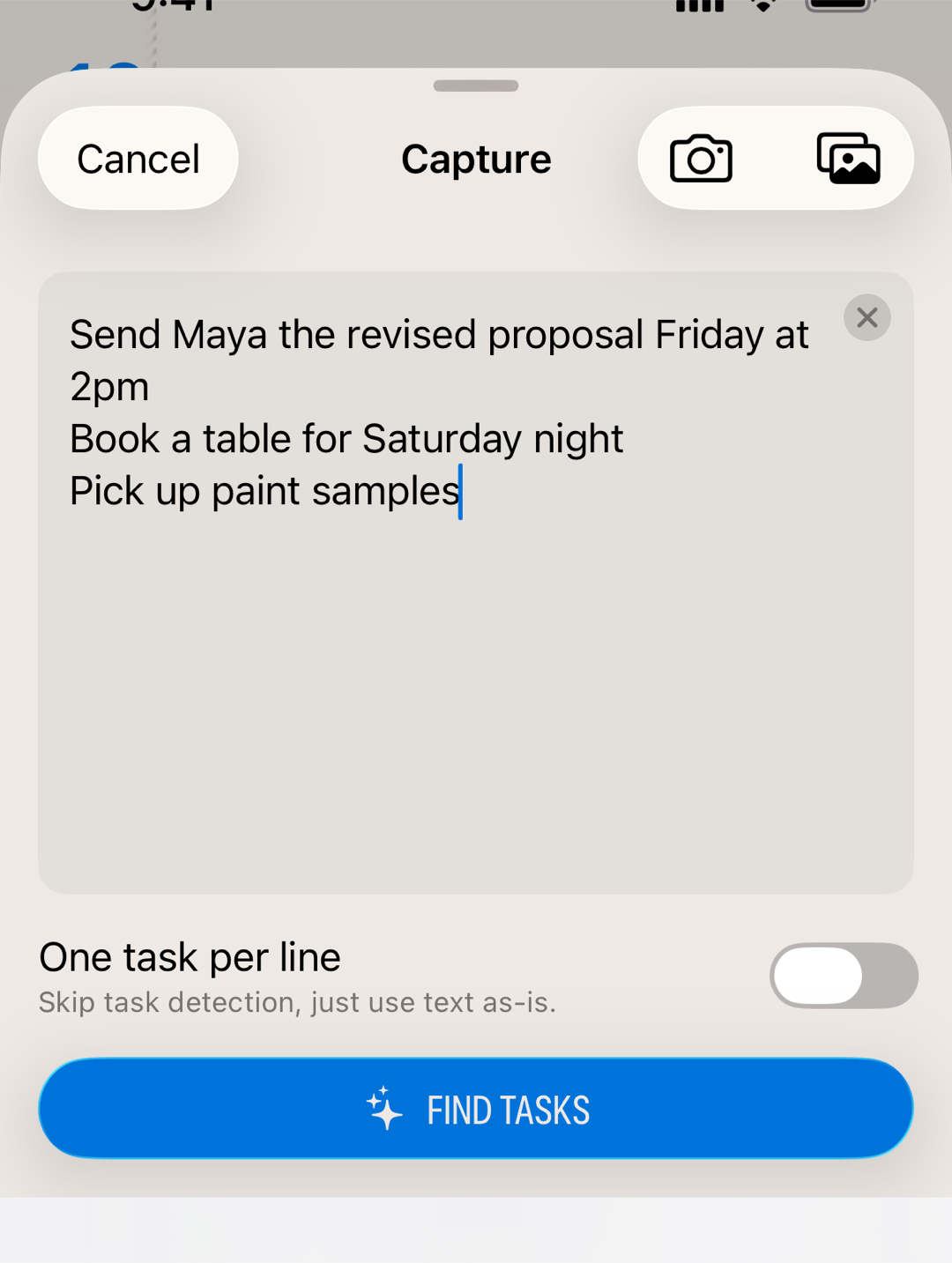
Capture: from text or photo
Open Smart Assistant and choose Capture. Type or paste anything: an email, meeting notes, a packing list. Or add a photo from your camera or library, and Finalist reads the text right off it. The paste button handles images too, so a copied screenshot or photo is read the same way as a picked one. On devices with the newest on-device AI the recognition is strong enough for handwriting; everything happens on your device.
Capture also opens when you share to Finalist from another app: shared text, links, and images land in the sheet ready to go. Attached photos appear as thumbnails above the editor. Tap one to see it full size (pinch or double-tap to zoom) and check the recognized text against the original. Remove a photo and the text it contributed goes with it, as long as you haven't edited that text yourself.
Then choose how to split it:
- Find Tasks lets the AI tease actual actionable items out of the text, skipping the filler.
- One task per line does exactly what it says, which is perfect for lists that are already lists.
The review sheet
Nothing is created behind your back. Every found task appears in a review sheet where you can edit titles, toggle each item on or off, and adjust dates and times (Finalist strips them out of the titles so "dentist Tuesday 2pm" becomes a clean "Dentist" scheduled for Tuesday at 2pm). Detected phone numbers, links, emails, and addresses show as chips you can keep or dismiss.
The captured text rides along at the top, and it stays workable. Edit it to fix a misread word, select part of it, or copy the whole thing out with the copy button. Once you change the text, a Find Again button appears to re-run the detection on your corrected version. Photos come along too: tap a thumbnail to zoom in and compare the original against what was read.
There's also a blank row below the found tasks for typing in your own. Reading the captured text next to the AI's list is exactly when you spot what it missed, or think of something new, so add it right there. Typed rows get the same date and time detection as everything else, and they survive a Find Again.
Then pick a destination: Tasks puts them on the day you're viewing, Reminders creates them in Apple Reminders, and Calendar turns them into calendar events (available when every selected item has a date). That last one is great for pasting in a schedule and getting real events out of it.
Dictate: just talk
Choose Dictate from Smart Assistant, or start it without opening the app from the Lock Screen widget or Control Center. Speak while the live transcription grows on screen, tap to stop, and edit the text if the transcription got creative. Then:
- Find Tasks runs the same extraction and review flow as Capture. Speak a stream of consciousness; get a clean list of actions (or grocery items).
- Add Note saves the whole transcription as a note on today, with an AI-generated title. Ideal for ideas that aren't tasks yet.
Privacy
Both features run entirely on your device. Your text, photos, and voice never leave it.
Related: Adding Tasks · Notebooks & Notes · The Daily Rhythm