
Finalist in Two Minutes
The whole app in one skim, with a door into the details wherever you want them.
Prefer skimming to setup guides? Here's the whole app in two minutes, with links if you want to go deeper.
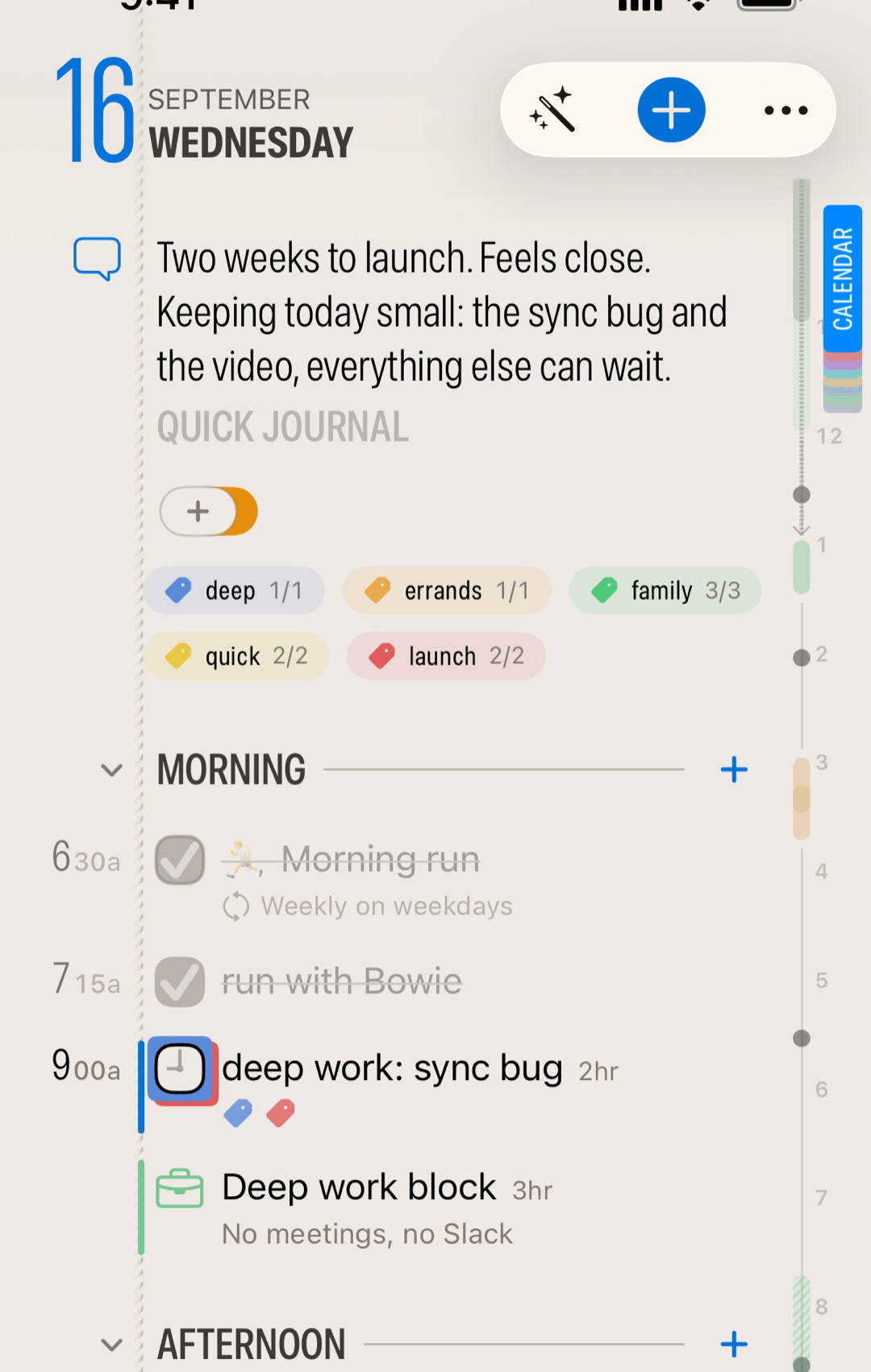
Your day is the app
Open Finalist and you're on the Daily tab: today's tasks, your calendar events, the weather, your habits, your journal entries, all on one page. No inbox to process, no dashboard to configure. It's your day page, and swiping left and right flips to tomorrow and yesterday like a paper planner.
You'll see five kinds of things
Simple tasks you create live only in Finalist. Reminders and calendar events will also appear in Apple's apps. Habits repeat on their own and track streaks inside Finalist. Notes hold what you keep rather than what you do, and come in two flavours: simple Notes that stay in Finalist, and File-based notes that can sync with systems like Obsidian. Knowing which is which is the one bit of theory worth another two of your minutes.
Yesterday doesn't follow you around
Anything you didn't finish yesterday can show up in an optional Outstanding section on Today. Do those tasks, reschedule them, or let them go. Nothing rolls over unless you say so; the deliberate procrastination is called punting, and Finalist makes it easy to make sure you have the space to get stuff done today.
Your fingers do most of the work
Swipe a task right to punt it to tomorrow (or pull an old one or a future one into today). Swipe left to delete a task or skip a habit. Deleted something by accident? It's waiting in the Deleted list on the Lists or Notes tab. Tap below your tasks to write a new one, times included like "Call Sarah at 2pm" just work. And any task can hold subtasks when it's secretly three tasks in a trench coat.
The right margin is alive
That colored edge on the right? Calendar Bookmarks: tap a tab to show or hide that calendar, no settings required. Or tap and hold to preview your events for only that calendar. Swipe up to collapse them and a subtle time strip takes over. The full Timeline tab turns your day into an hourly grid with the weather alongside, which is where plans meet reality.
Beyond today
The Lists tab is your binder: projects, someday lists, shopping lists with running totals, plus Smart Lists that gather what's due across everything. Habits quietly build your streaks. Notes give your plans a place to live, and if your notes already live in an Obsidian vault, Finalist reads those too.
When typing is too slow
The wand button opens the Smart Assistants. Capture turns a pasted email or a photo of a whiteboard into tasks; Dictate turns your rambling into a clean list. You approve everything before it lands, and it all runs on your device.
Make it feel like yours
Two paper designs (one of them typeset like a newspaper), rearrangeable sections and layout presets, and color themes you can share as QR cards. It makes your planner a happy place.
That's the two minutes
Ready to actually try it? Your First Day walks you through planning one real day, punt included. And if you want the philosophy behind all this restraint, start with One Day at a Time.
Related: Welcome to Finalist · Your First Day · Setting Up
Want to see what your own day looks like in Finalist? Download it on the App Store.